
Need for Speed™ Heat
Publisher: Electronic Arts
Need for Speed™ Heat runs excellently through CrossOver at a median 44 fps (4 reports), and barely playably in Parallels (1 report) on Apple Silicon. Based on 5 reports across M1 Max, M4, M4 Pro.
Mac Performance
Experience Reports
5
Average Rating
3.4/ 5
Play Methods
- Native0
- CrossOver4
- Parallels1
- Other0
Game Information
Hustle by day and risk it all at night in Need for Speed™ Heat, a white-knuckle street racer, where the lines of the law fade as the sun starts to set. By day, Palm City hosts the Speedhunter Showdown, a sanctioned competition where you earn Bank to customize and upgrade your high-performance cars. At night, ramp up the intensity in illicit street races that build your reputation, getting you access to bigger races and better parts. But stay ready – cops are waiting and not all of them play fair.
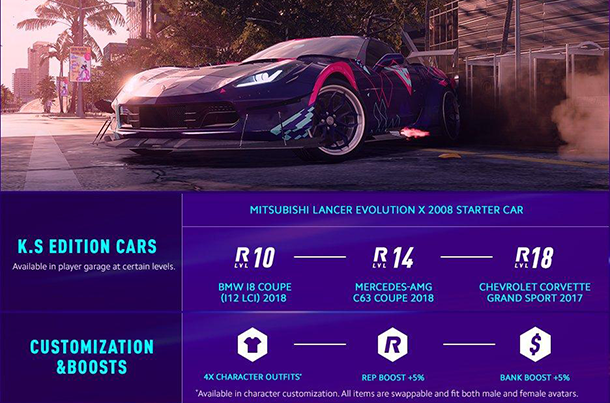
The Deluxe Edition comes with:
- K.S Edition Mitsubishi Lancer Evolution X Starter Car, available at start in player garage
- 3 additional K.S Edition cars unlocked through progression
- 4 exclusive character outfits — swappable and fit both male and female avatars
- REP rewards increased by 5%
- BANK rewards increased by 5%
Need for Speed Heat is Crossplay enabled.
Experience Reports


PLAYWINDOWSGAMES
ONMAC
*Affiliate link. Supports this site & Mac gaming through CodeWeavers' contributions to Wine.


CrossOver
v25.0.1

- Graphics:
- MEDIUM
- FPS:
- 40
- Resolution:
- 1512x982
- Machine:
- MacBook Pro
- Chip:
- M4 BASE
- Cores:
- 10 CPU, 10 GPU
- RAM:
- 16 GB
Review Note:
Midium-40fps
High-36fps
CrossOver
v25.0.1- Graphics:
- MEDIUM
- FPS:
- 48
- Machine:
- MacBook Air
- Chip:
- M4 BASE
- Cores:
- 10 CPU, 10 GPU
- RAM:
- 32 GB
CrossOver
v25.1.1

- Graphics:
- HIGH
- FPS:
- 60
- Resolution:
- 1512x982
- Machine:
- MacBook Pro
- Chip:
- M1 MAX
- Cores:
- 10 CPU, 32 GPU
- RAM:
- 32 GB
Review Note:
Very tricky to get running due to EA App / Steam handshake issues, but once launched it is decently playable (~45 FPS on High at 1080p). Takes 15–20 minutes of playtime for stuttering to settle (shader compilation).
What worked for me (M1 Max, CrossOver 25):
Installed EA App directly via CrossOver’s “Install a Windows Application” database (search for “EA App” or “EA Desktop” – do not download the installer from ea.com)
Launched the game only through Steam (not directly via exe)
Linked my Steam account to my EA account before trying to play (critical – otherwise activation errors like “DisplayName missing” appear)
Bottle settings that helped:
Graphics backend: D3DMetal (Has some weird lighting issues tho totally fine doesn't effect gameplay)
MSync: off
High-resolution mode: off
Emulate virtual desktop: off (did not test with it on)
System clock set to automatic (timezone sync)
Performance notes:
Best results on High preset → ~45-60 FPS at 1080p
Switching to Medium or Low did not improve FPS and actually increased stuttering
Ultra settings gave lower FPS 20-30
After 15–20 minutes of gameplay (practice race / free roam) stuttering became minimal
Occasional minor texture glitches, but overall definitely playable
Important warnings:
Steam ↔ EA account linking must be correct before launch, otherwise the game will break during the handshake
Did not use CXpatcher – it might fix texture issues or improve FPS further, but I didn’t test it
Didn’t experiment much with other translation layers (Whisky, GPTK, etc.) after getting it stable
Tips for others:
Use CrossOver’s built-in installer to add EA App (no external download needed)
Log into EA App first, confirm Steam-EA link is active
Launch via Steam, not the game exe
Be patient with initial stuttering – let shaders compile
Stick to High settings if you’re getting ~45-60 FPS; lowering presets didn’t help much in my testing
Verdict:great for casual sessions once past the setup hurdles. Worth the effort if you want local play.
CrossOver
v26- Graphics:
- ULTRA
- FPS:
- 40
- Resolution:
- 3456x2234
- Machine:
- MacBook Pro
- Chip:
- M1 MAX
- Cores:
- 10 CPU, 32 GPU
- RAM:
- 32 GB
Review Note:
Really not easy to configure the right way...
First, this game is running with the same fps (~30) from Ultra to High settings in all possible resolutions, sometimes a lower res is slower :(.
Set Reflection to 'Low', this can get you +10 fps, so you can play on Ultra with native resolution (3.5k) on about 32-42 fps in best possible quality.
It's slow in full rendered scenes like in the Hideout, talking with your friends or tuning your car (~15 fps).
Make sure to craft a 'user.cfg' in the game directory with a tool or by hand, containing:
Thread.ProcessorCount 10
Thread.MaxProcessorCount 10
Thread.MinFreeProcessorCount 0
Thread.JobThreadPriority 0
GstRender.Thread.MaxProcessorCount 10
Set the in-game Overlay in the EAClient to 'Off'.
Wine MSync and in-game VSync 'on'.


Parallels
v26

- Graphics:
- LOW
- Machine:
- MacBook Pro
- Chip:
- M4 PRO
- Cores:
- 12 CPU, 16 GPU
- RAM:
- 24 GB
Review Note:
Loading Sequence all good.
Menu already pretty laggy. Gameplay mostly not possible.