
Far Cry® 4
Publisher: Ubisoft
Far Cry® 4 runs excellently through CrossOver at a median 55 fps (6 reports) on Apple Silicon. Based on 6 reports across M1 Pro, M2 Pro, M4, M4 Pro.
Mac Performance
Experience Reports
6
Average Rating
3.3/ 5
Play Methods
- Native0
- CrossOver6
- Parallels0
- Other0
Game Information
Key Features
• EXPLORE AN OPEN WORLD FILLED WITH POSSIBILITIES
Discover the most diverse Far Cry world ever created. With terrain spanning from lush forests to the snowcapped Himalayas, the entire world is alive…and deadly.
- From leopards, rhinos, black eagles, and vicious honey badgers, Kyrat is home to abundant wildlife. As you embark on your hunt for resources, know that something may be hunting you...
- Scout enemy territory from above in the all-new gyrocopter and then plummet back to earth in your wing suit. Climb aboard the back of a six-ton elephant and unleash its raw power on your enemies.
- Choose the right weapon for the job, no matter how insane or unpredictable that job might be. With a diverse arsenal, you’ll be prepared for anything.
• CO-OP: BRING A FRIEND
Not every journey should be taken alone. Far Cry 4 allows for a second player to drop in and drop out at any point, re-imagining the cooperative experience in the true spirit of Far Cry for the next generation. You’ll now be able to discover and explore the living open world of Kyrat together.
Experience Reports


PLAYWINDOWSGAMES
ONMAC
*Affiliate link. Supports this site & Mac gaming through CodeWeavers' contributions to Wine.


CrossOver
v25.0.1

- Graphics:
- HIGH
- Resolution:
- 1920x1080
- Hardware:
- M4 BASE
Review Note:
Game runs very smoothly with DXMT and MSYNC. However, the dialogue audio during cutscenes is either extremely quiet or completely silent and therefore not an enjoyable experience. The common Windows fix of switching audio from 5.1 to Stereo doesn’t work on Mac. I wasn’t able to get the Metal benchmarking tool to work in this game, so I don’t have an exact FPS count, but performance felt very smooth. D3DMetal kept tabbing me in and out of the game and DXVK kernel panicked
CrossOver
v26

- Graphics:
- HIGH
- FPS:
- 35
- Resolution:
- 1920x1080
- Machine:
- MacBook Pro
- Chip:
- M4 PRO
- Cores:
- 14 CPU, 20 GPU
- RAM:
- 24 GB
Review Note:
d3dmetal did not want to run the game. I'd be stuck on a weird black screen loop where it would open then minimize again and again. Tried dxmt then it was somewhat playable but just the previous reviewer mentioned, the audio was close to silent. I couldn't hear anything tbh. Overall it was a bad experience had to refund it right away.
CrossOver
v25.1.1- Graphics:
- HIGH
- Machine:
- MacBook Air
- Chip:
- M4 BASE
- Cores:
- 10 CPU, 8 GPU
- RAM:
- 16 GB
CrossOver
v26.0 CXPatcher

- Graphics:
- HIGH
- FPS:
- 60
- Resolution:
- 1920 X 1200
- Machine:
- MacBook Pro
- Chip:
- M1 PRO
- Cores:
- 10 CPU, 14 GPU
- RAM:
- 16 GB
Review Note:
A few fixes need to be applied to make the game fully enjoyable.
Firstly, there are some graphical glitches (looks like floating squares). It can be fixed by adding DXMT_CONFIG="dxgi.customVendorId = 1002;dxgi.customDeviceId = 73df;" to the environment variable when launching Steam through Crossover.
For the audio issues, there are a few steps that need to be done to fully fix it. Firstly, add xaudio2_7 (builtin) to the library override. Make sure it is set to builtin, not the default (native, builtin). Secondly, we need to mix the surround sound output into a stereo mix. I achieve this by using the apps BlackHole and Ladiocast.
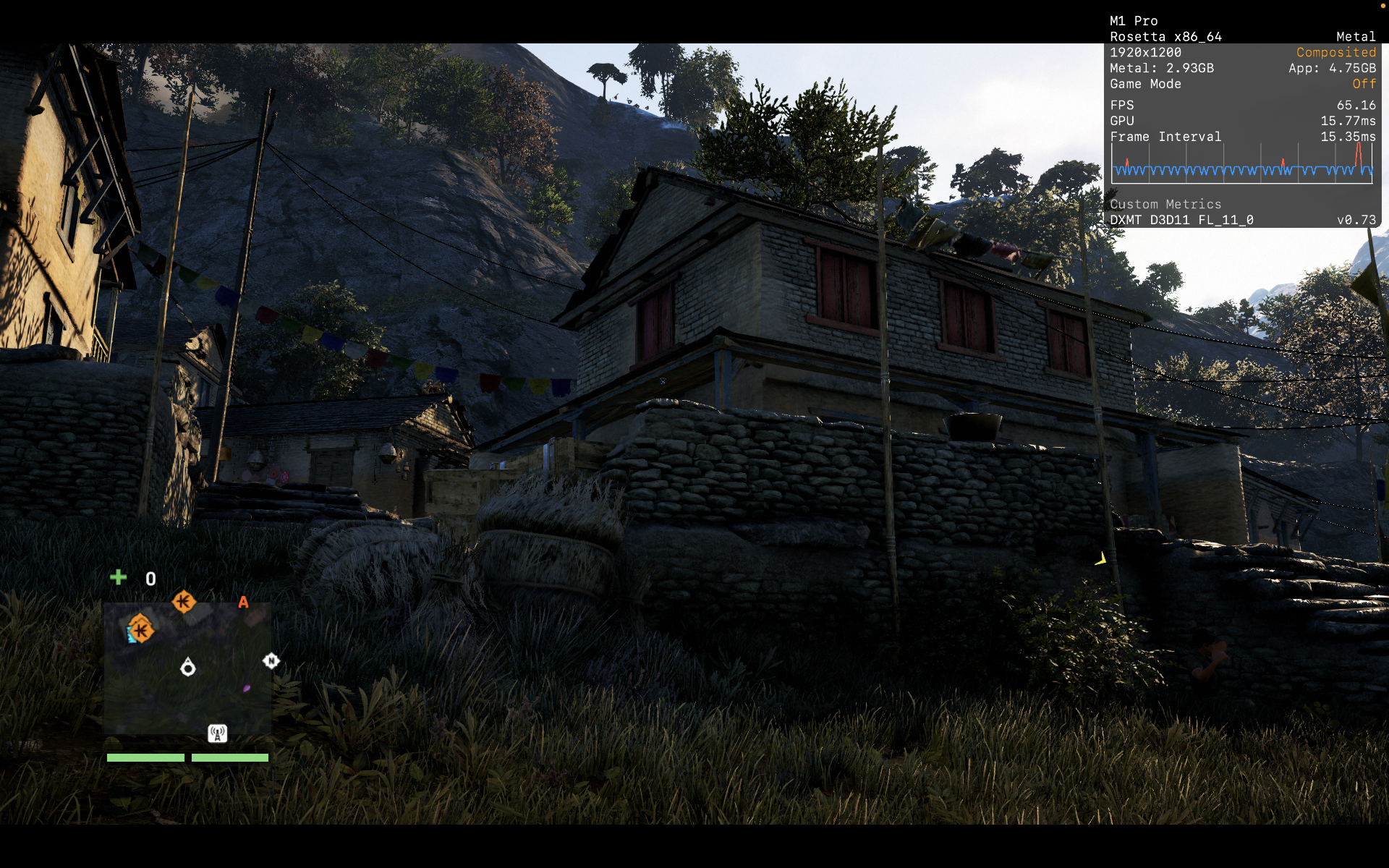
On my M1 Pro at the Very High Settings, I was able to play for several hours without issues and the game is mostly at 60 - 75 fps with very occasional dips to the high 50s fps.
CrossOver
v26.0

- Graphics:
- ULTRA
- FPS:
- 55
- Resolution:
- 2056x1329
- Machine:
- MacBook Pro
- Chip:
- M2 PRO
- Cores:
- 12 CPU, 19 GPU
- RAM:
- 32 GB
Review Note:
To fix muted/missing audio install https://github.com/macprotips/MacStereoFix and force stereo output. In wine settings add the FarCry4.exe, add a library override for xaudio2_7 and set it to builtin.
CrossOver
v26.0- Graphics:
- HIGH
- FPS:
- 55
- Resolution:
- 1920x1200
- Machine:
- MacBook Pro
- Chip:
- M2 PRO
- Cores:
- 10 CPU, 16 GPU
- RAM:
- 16 GB
Review Note:
Major issues are black square artifacts on some houses, and dialogue not being played.
The black square issue has no fix, but isn't that much of an eyesore.
The dialogue can be fixed by setting the wine prefix windows version to Windows XP, setting xaudio2_7 to builtin and using MacStereoFix