DEATH STRANDING DIRECTOR'S CUT
Publisher: 505 Games
DEATH STRANDING DIRECTOR'S CUT runs excellently natively at a median 60 fps (14 reports), and excellently through CrossOver at a median 60 fps (3 reports) on Apple Silicon. Based on 17 reports across M1 to M5.
Mac Performance
Experience Reports
17
Average Rating
4.7/ 5
Play Methods
- Native14
- CrossOver3
- Parallels0
- Other0
Game Information
DEATH STRANDING Upgrade
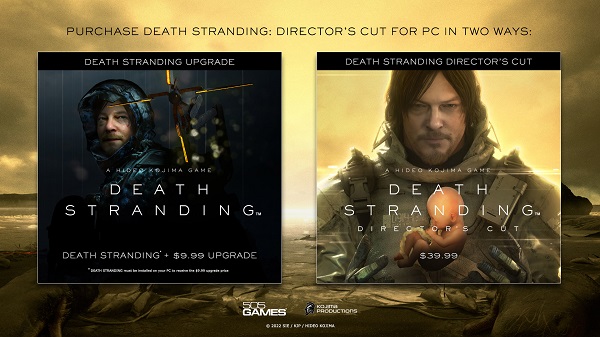
Please make sure you purchase right version of DEATH STRANDING DIRECTOR'S CUT.
If you already own DEATH STRANDING then you can upgrade your version of the game to DEATH STRANDING DIRECTOR'S CUT for a lower price. Please purchase the DEATH STRANDING DIRECTOR'S CUT UPGRADE. You must have previously purchased DEATH STRANDING on this platform, and have it installed on your system.
If you have not purchased DEATH STRANDING then you may purchase DEATH STRANDING DIRECTOR'S CUT at the stated full price.
We recommend you do not remove DEATH STRANDING from your PC until you have completed the download of DEATH STRANDING DIRECTOR’S CUT and you have transferred your save files to DEATH STRANDING DIRECTOR’S CUT.
About the Game
From legendary game creator Hideo Kojima comes a genre-defying experience, now expanded in this definitive DIRECTOR’S CUT.In the future, a mysterious event known as the Death Stranding has opened a doorway between the living and the dead, leading to grotesque creatures from the afterlife roaming the fallen world marred by a desolate society.
As Sam Bridges, your mission is to deliver hope to humanity by connecting the last survivors of a decimated America.
Can you reunite the shattered world, one step at a time?
DEATH STRANDING DIRECTOR’S CUT on PC includes HIGH FRAME RATE, PHOTO MODE and ULTRA-WIDE MONITOR SUPPORT. Also includes cross-over content from Valve Corporation’s HALF-LIFE series and CD Projekt Red’s Cyberpunk 2077. Stay connected with players around the globe with the Social Strand System™.
All copies of the game will also additionally include:
• “Selections From ‘The Art of DEATH STRANDING’” Digital Book (by Titan Books)
• Backpack Patches
• Bridges Special Delivery Team Suit (Gold)
• BB pod customization (Chiral Gold)
• Power Gloves (Gold)
• Bridges Special Delivery Team Suit (Silver)
• BB pod customization (Omnireflector)
• Power Gloves (Silver)
Experience Reports


PLAYWINDOWSGAMES
ONMAC
*Affiliate link. Supports this site & Mac gaming through CodeWeavers' contributions to Wine.


CrossOver
v25.0.1

- Graphics:
- HIGH
- FPS:
- 60
- Resolution:
- 1920x1080
- Hardware:
- M4 MAX
Review Note:
AMD FidelityFX set to Quality
VSYNC On
The initial load takes a while, but it's good after that. Don't own the Native version to compare.
CrossOver
v25.1.1

- Graphics:
- ULTRA
- FPS:
- 60
- Resolution:
- 2100x900
- Machine:
- MacBook Pro
- Chip:
- M1 PRO
- Cores:
- 10 CPU, 16 GPU
- RAM:
- 32 GB
Review Note:
With temporal upscale at Quality (2100x900 to 1365x585) & all the settings maxed out, it runs at 60 most of the time, with some rare dips at 55, max 50. Very good performance for an AAA game on mac!
CrossOver
v26.0

- Graphics:
- HIGH
- FPS:
- 60
- Resolution:
- 1920x1080
- Machine:
- MacBook Pro
- Chip:
- M5 BASE
- Cores:
- 10 CPU, 10 GPU
- RAM:
- 16 GB
Review Note:
no stutters, works very good with high settings :)

Native
- Graphics:
- ULTRA
- Resolution:
- 3440x1440
- Hardware:
- M4 MAX
Native

- Graphics:
- ULTRA
- FPS:
- 60
- Resolution:
- 2560x1440
- Hardware:
- M4 PRO
Review Note:
Locked 60 except 2 or 3 areas on the map where it drops to 30 in combat, overall very solid. Wireless DualSense full support (very rare and impressive).
Native
- Graphics:
- HIGH
- Resolution:
- 2560x1600
- Hardware:
- M1 PRO
Native
- Graphics:
- ULTRA
- FPS:
- 75
- Resolution:
- 1920x1080
- Hardware:
- M4 PRO
Review Note:
M4 Pro with 14-core CPU, 20-core GPU.
Native
- Graphics:
- HIGH
- FPS:
- 60
- Resolution:
- 1920x1080
- Hardware:
- M1 PRO
Native

- Graphics:
- ULTRA
- Resolution:
- 4K
- Hardware:
- M4 BASE
Review Note:
Mini M4, 32GB. Runs extremely well with full controller support [DS4], love it!
Native

- Graphics:
- ULTRA
- FPS:
- 60
- Hardware:
- M2 PRO
Screenshots:
Native

- Graphics:
- HIGH
- FPS:
- 60
- Resolution:
- 2560x1440
- Hardware:
- M3 PRO
Review Note:
M3PRO, 11CPU, 12GPU
Native
- Graphics:
- HIGH
- FPS:
- 60
- Resolution:
- 2560x1600
- Machine:
- MacBook Pro
- Chip:
- M4 BASE
- Cores:
- 10 CPU, 10 GPU
- RAM:
- 16 GB
Review Note:
default settings 60 fps with 1440p res
Native
- Graphics:
- HIGH
- FPS:
- 90
- Resolution:
- 1920x1200
- Machine:
- MacBook Pro
- Chip:
- M4 BASE
- Cores:
- 10 CPU, 10 GPU
- RAM:
- 16 GB
Review Note:
default settings at 1080p with 90 fps
Native

- Graphics:
- HIGH
- FPS:
- 60
- Machine:
- MacBook Air
- Chip:
- M3 BASE
- Cores:
- 8 CPU, 10 GPU
- RAM:
- 16 GB
Native
- Graphics:
- ULTRA
- FPS:
- 60
- Resolution:
- 1920x1080
- Machine:
- Mac mini
- Chip:
- M4 BASE
- Cores:
- 10 CPU, 10 GPU
- RAM:
- 16 GB
Review Note:
outstanding performance with quality in Mac mini m4
Native

- Graphics:
- HIGH
- FPS:
- 60
- Resolution:
- 2560x1440
- Machine:
- MacBook Pro
- Chip:
- M1 MAX
- Cores:
- 10 CPU, 32 GPU
- RAM:
- 64 GB
Native

- Graphics:
- ULTRA
- FPS:
- 90
- Resolution:
- 3561x2234
- Machine:
- MacBook Pro
- Chip:
- M5 MAX
- Cores:
- 18 CPU, 32 GPU
- RAM:
- 128 GB
Review Note:
All settings maxed out, modified config files to use the maximum native resolution of the 16" MacBook Pro. Does use Temporal Metal scaling, scaling input resolution is 2592x1676 with target resolution at 3456x2234.
Performance is going to vary a lot by location and activity. In many situations you can get a full 120 fps, but some places will dip as low as around 80 fps. A solid expected middle ground on the lower end of things is 90. I haven't tried it, but if you toned down resolution and some graphics settings, you could perhaps get a 120fps lock.
If you want to reduce system load, without fluctuation of frames, locking it to 60 is a good option, as it will render a smooth locked 60 without any drops I've noticed. Unlike with Windows, it doesn't seem like you can fine tune macOS (for native) to lock at a custom framerate, such as 70 or 80.
I've also tried Steam version via CrossOver on the same machine. Also very good performance, but it is easier to modify config file for native macOS to increase resolution to match the MacBook display, and it will provide you with better fps and superior thermals.